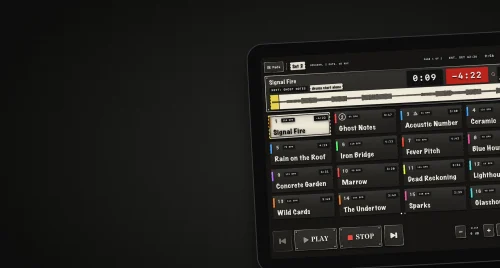
Big, dark and easy to read
The app is dark only, and its text starts large and only scales up. On iPad it runs in landscape, and the sixteen pads resize so a full page still reads on an iPad Air.

Click Left is an iPad and iPhone app our founder James built for his own drumming. It plays backing tracks with the click in the drummer’s ears and the band mix to the desk, from a screen designed to be read and used from behind a kit.
Visit clickleft.app
James plays drums in two bands. One runs pre-mixed backing tracks and the other plays most of its set to a click. Live, the drummer is usually the one starting the tracks, from the stool, with the lights down and the screen at arm’s length.
A backing track that cuts out mid-song leaves the whole band exposed, so whatever plays it has to be dependable.
James had been running MainStage on a laptop and a Roland SP-404 sampler. He wanted one app that did this job and nothing else, with no mixer, lyrics, MIDI or plugins to get in the way.
Tracks from different sessions arrive at different loudness, and balancing them by hand takes an evening every time the set changes.
Backing tracks usually come as one stereo file, with the click on the left channel and the band mix on the right. A Y-cable or an audio interface sends the click to the drummer’s in-ear monitors and the mix to the front-of-house desk. Click Left is built around that setup, on iPad and iPhone.
The app is dark only, and its text starts large and only scales up. On iPad it runs in landscape, and the sixteen pads resize so a full page still reads on an iPad Air.
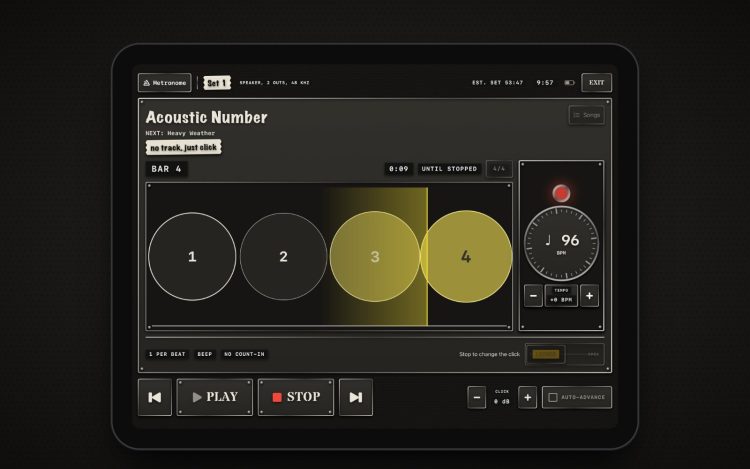
While a song plays, other pads need a long press. The metronome starts locked behind a slider, and a held or bouncing pedal can't skip a song.
The screen looks like the lid of a road case, with gaffer tape, marker pen and Dymo labels. Tape colours identify songs, and the armed song is boxed, so colour is never the only signal.
James uses Click Left at his own gigs. When something does go wrong, the app tells him what happened, and it never starts a song by itself.
Each file is decoded in full and rewritten on import, so a damaged file shows up on the sofa instead of mid-set.
The current song and the next one are held in memory, so starting the next song never waits on the disk.
Sound goes straight from the song to the outputs, with no mixer or effects in between. If the audio thread can’t get what it needs in time, it plays a moment of silence and carries on.
If playback stalls for a second, a watchdog restarts the audio engine and says so on screen. If an output disappears, sound moves to the first two outputs.
A phone call stops the song and explains why, because a song restarting by surprise is worse than silence. After a crash, the next launch offers to resume the set.
The stage screen never checks whether the app has been paid for, so a weak connection at a venue can’t lock anyone out.
The free version holds six songs and a setlist. One unlock removes the limits, with no subscription and no account. There’s no server, no sign-up and no data collected, so everything the stage screen needs is already on the device. Songs and setlists can be filed by band, each with its own click level, and the whole library backs up to a plain folder.