SJ Dixonour work

We built SJ Dixon an internal portal that turns a manufacturer’s spreadsheet into OrderWise import files. Most of that is ordinary code. AI is used where a file needs a judgement, and the product listing lead checks it before export.

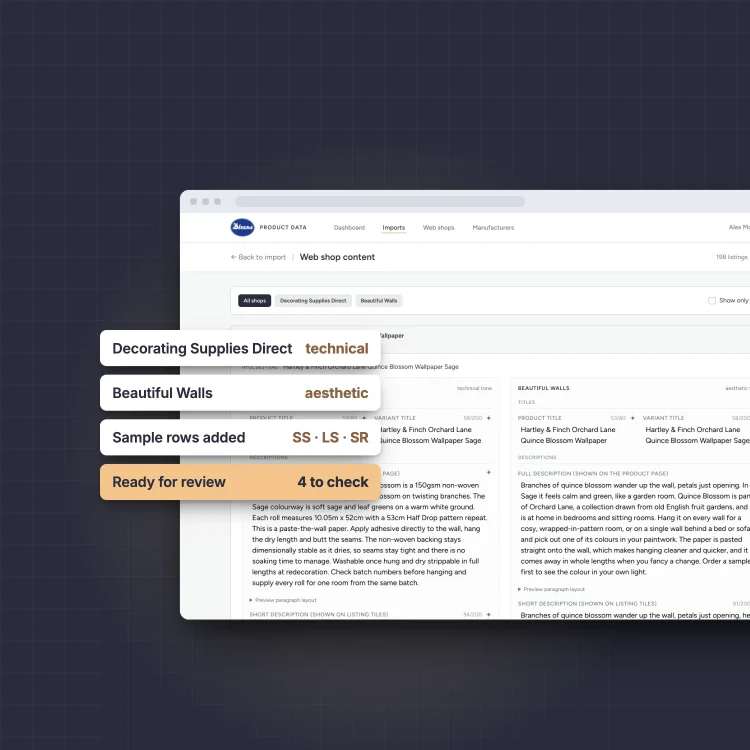
The SJ Dixon product data portal with chips for each shop voice and the sample rows it adds

The Challenge Up to ten import sheets a range

SJ Dixon is a family-run wallpaper and decorating supplies business in Wolverhampton. It sells online through Decorating Supplies Direct, for the trade, and Beautiful Walls, for luxury wallpaper. A new manufacturer range has to be listed before it can be sold.

The portal One upload, then a review

A supplier’s spreadsheet goes in. The portal does the copying and applies SJ Dixon’s house rules, flags anything it isn’t sure about, and produces the import sheets once the listing lead has checked them.

The SJ Dixon portal showing copy for Decorating Supplies Direct and Beautiful Walls side by side

How it works From supplier file to import pack

Reading the supplier's file

A supplier the portal has seen before is recognised from its column headers and read with plain code. For a new supplier, AI proposes how the columns map onto OrderWise, the listing lead confirms it, and the layout is saved for next time.
Grouping and coding

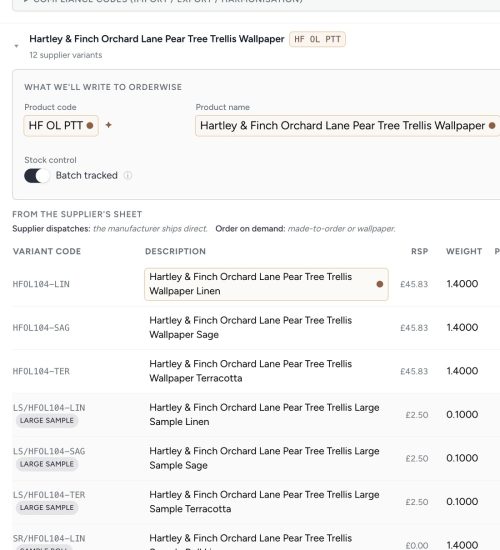
Variants are grouped into products and given SJ Dixon’s own product codes. Wallpaper gets its small sample, large sample and sample roll rows added automatically, with the right accounting settings.

Writing for each shop

AI drafts titles, descriptions and SEO text in each shop’s voice: technical for Decorating Supplies Direct, and about the look for Beautiful Walls. Descriptions come as the three paragraphs the product page already uses, so nobody reformats them by hand. Categories and features can only be picked from that shop’s own lists.

Review, approve, download

The listing lead checks the flagged cells, approves the import and downloads a pack of import sheets. SJ Dixon’s team then loads it into OrderWise. Images and a later SEO pass stay with them.

“already it looks like a lot less work than what I have to do at the minute.”

Product listing lead, SJ Dixon, at the first demo

The details came from working through real ranges with her. One brand is bought through a different supplier, so OrderWise needs the supplier’s code while every title has to lead with the brand. The portal keeps the manufacturer, the supplier code and the customer-facing brand separate, so those titles no longer need fixing after export.

AI with guardrails Checked before it leaves the portal

AI handles the judgement calls: mapping a new supplier’s columns, product codes and copy. Each of those goes through review.

  • Every cell shows where its value came from and how sure the portal is. Anything below 90% is highlighted.
  • Any single field can be rewritten with an instruction from the reviewer.
  • Categories and features outside the shop’s own lists are rejected. For Decorating Supplies Direct that’s 174 category paths and 379 feature values.
  • Imports are approved before the final download, and every edit is logged with who changed what.
Import review for an invented wallpaper range, with product code and name cells highlighted for checking and large sample rows added

How the project ran From first call to live ranges

Call

A conversation about listing

We talked to SJ Dixon about how new ranges were getting onto their two shops, and where the time went.

Brief

A first phase, agreed on site

A written proposal for a first phase, then a visit to Wolverhampton to watch the listing process and agree the scope.

Proof of concept

A working first version

We showed the product listing lead a working portal on the kind of supplier files she works with.

Validation

Checked against real work

We compared its output with a range she had already listed by hand, then ran real supplier ranges through it and fixed what they turned up.

Production

Live on real ranges

The portal runs on Laravel Cloud, and SJ Dixon exports real ranges through it, including one of 323 variants processed as a single import.

Next

What could come after

Possible next steps include handling product images and connecting directly to OrderWise.

Retyping supplier data into your stock system?

Book a 20-minute call. We’ll look at where your team copies product data by hand, and which parts a tool could prepare for them to check.