Is AI going to kill us? What I said on The Human Mix
- 24.09.2026

SpaceMan is a free Mac app that shows what’s using your disk, sorted by what each thing is instead of which folder it sits in. Simulator runtimes, DerivedData, AI models, package caches and old project builds each get a proper name and a size, and you can tick the ones you want gone. Simon Frost, our iOS developer, built it over a week. It’s open source under the MIT licence.
Developer tools scatter gigabytes across dozens of folders with names nobody can read. A folder-size tool will tell you that ~/Library/Developer is 80 GB. It won’t tell you which 80 GB, or that a folder called af14d04f….asset is iOS 26.5. iOS work alone spreads across simulator runtimes, simulator devices, device support files, DerivedData, Swift package caches and however many copies of Xcode you’ve kept. The Mac in the screenshot below has 229 GB of its 494 GB disk in that one category.
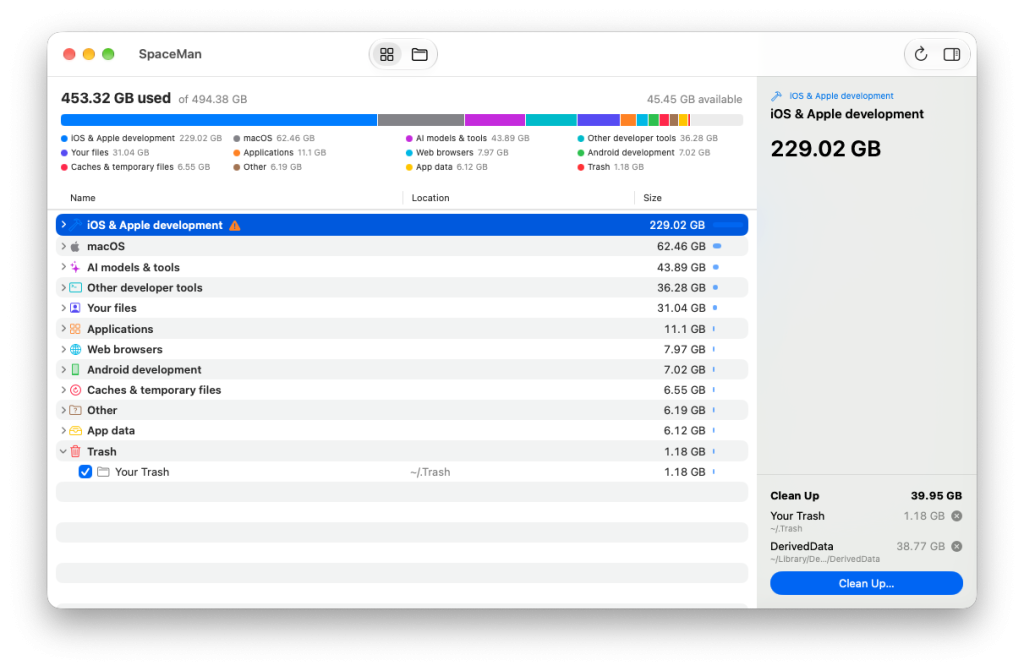
SpaceMan scans the whole disk and sorts what it finds into categories: iOS and Apple development, AI models and tools, web development, Android development, other developer tools, applications, web browsers and macOS. Each category opens up into the things inside it, named from the metadata on disk. A simulator’s UUID folder becomes “iPhone 17 Pro · iOS 26.5”, and a DerivedData folder takes the name of the project it was built from.
Select anything and SpaceMan says what it is and how to get the space back safely. It also flags leftovers: simulator runtimes Xcode no longer knows about, simulators whose runtime has gone, DerivedData for projects you’ve deleted, and caches built for an older version of macOS.
The AI category covers Claude Code and the Claude desktop app, ChatGPT and Codex, Ollama, LM Studio, Hugging Face models, Chrome’s built-in Gemini Nano and Apple Intelligence. Anyone running local models will know how quickly those add up.
It looks for build folders at any depth in ~/Code, ~/Projects and ~/Developer, and only counts one if git ignores it. That leaves out tracked folders, and folders called build inside vendor/ or .venv/, which are often library source.
When you find something to remove, tick it. The Clean Up list keeps a running total, and you can move everything on it to the Trash or delete it outright. Anything SpaceMan can’t safely delete shows a no-entry sign in place of a tick box, and hovering over the sign tells you why. If you’d rather browse by location, a switch in the toolbar shows the same scan as a folder tree. A full scan of a 450 GB disk holding 4.5 million files takes about 35 seconds.
Simon Frost is an iOS developer on our team, and SpaceMan is his second open source release, after DuoFrameSimulator in September. He started SpaceMan on the morning of 25 September and released version 1.0 that afternoon: a native SwiftUI app with its own disk scanner, a catalogue of rules for naming what it finds, and a build signed and notarised so anyone can install it. The scanner reads directories in bulk through a low-level macOS call. It counts the space each file really occupies, so sparse virtual machine disks show their true size, and it counts hard-linked files once. Other APFS volumes, and space that no folder accounts for, get rows of their own, so the totals add up to what the disk reports.
Version 1.3 came out on 1 October. One of its additions is a cache Xcode’s device tools keep without telling you: a full copy of every app bundle you’ve installed on a physical device, kept so the next install can send only the changes. Nothing ever deletes them, so the cache grows to gigabytes. SpaceMan lists it with one row per app and says it’s safe to remove.
SpaceMan needs macOS 26 or later. Download the latest release, open the DMG and drag SpaceMan into Applications. It’s signed with our Developer ID and notarised by Apple.
Anything SpaceMan doesn’t recognise still shows up under Other as a folder tree, so nothing large goes unseen. Teaching it about a new folder takes one rule in Catalogue.swift, and the README shows how.
The source is on GitHub under the MIT licence. It’s provided as-is and we don’t offer support for it.