SpaceMan: your Mac’s disk space, by what it is
- 02.10.2026


DuoFrameSimulator is a Swift package that reframes your running iOS app to the iPhone Duo’s display sizes, on whatever iPhone or iPad you already own. Simon Frost, our iOS developer, built it in the week after Apple announced the phone. Installing it is one line and it compiles to nothing in release builds. It’s on GitHub under the MIT licence.
Apple announced the iPhone Duo on 9 September. It folds, with a 5.5-inch display on the outside and a 7.6-inch one inside, and it goes on sale on 23 October. The design guidelines went up the same day and they ask a lot of an existing app. The inner display reports regular size classes in both directions, which until now has meant iPad. On the outer display, and on the inner one in landscape, the navigation bar and tab bar leave the top and bottom of the screen and move into a strip down one side.
A simulator didn’t go up the same day. Xcode 27 shipped the following week without one, so we had the point sizes and the guidelines, and no simulator to run an app in.
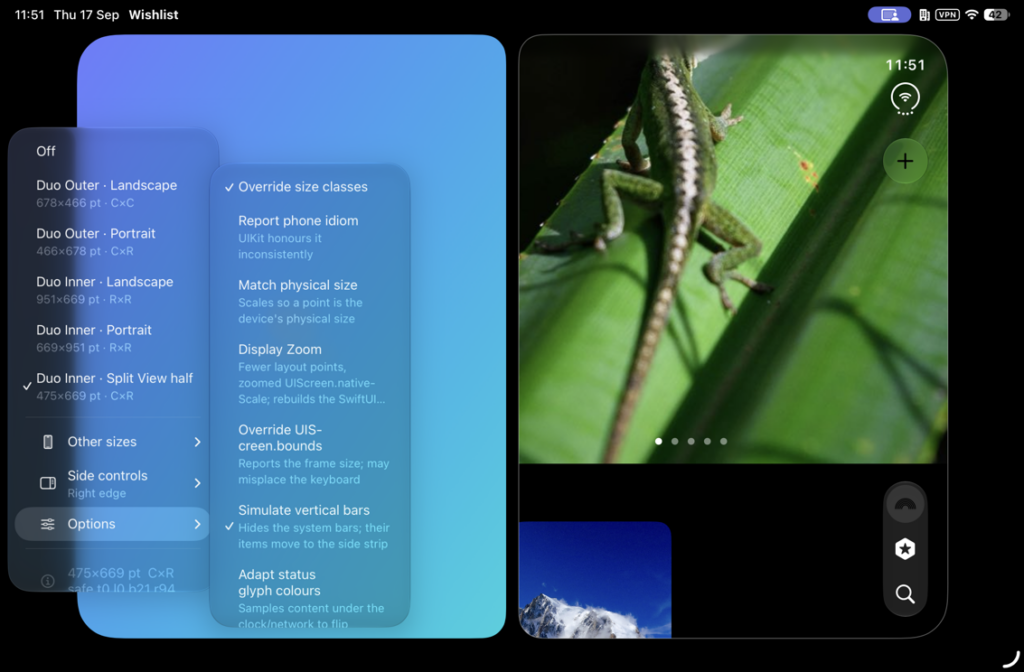
Add the package and call DuoFrameSimulator.install() once at launch, inside #if DEBUG. Shake the device and a menu button appears with five Duo poses: the outer display in landscape and portrait, the inner display in landscape and portrait, and half of the inner display in Split View. Pick one and your app is laid out again at that size, with that pose’s safe-area insets and size classes. The package hosts your app’s real root view controller, so what you’re looking at is the app itself laying out at the new size. Switching pose goes through the same trait and safe-area callbacks a real fold would fire, which means the code that responds to the change gets exercised too.
Turn on “Simulate vertical bars” and it hides the system bars and draws the Duo’s side strip: a fake Dynamic Island, a clock, and your app’s own navigation and tab items moved across. They still work, so tapping a tab in the strip switches the real tab view.
It runs on anything with iOS 17, but it’s most use on an iPad. On an iPhone the larger Duo frames have to scale down to fit. An iPad has room to draw them at full size, and the “Match physical size” option scales the frame so that a point on the iPad’s screen is as big as it will be on the Duo. You can put a thumb on a button and find out whether it’s big enough. Simon recommends an iPad mini, because at 1:1 its denser screen draws everything slightly smaller than the Duo will, so a control that’s big enough to hit on the mini will be big enough on the phone.
There’s also a shelf of ordinary iPhones, from the SE to the Pro Max, and a custom size. That’s for when the phone on your desk is a Pro Max and the bug report came from an SE.
The first version scaled the app’s view inside a full-screen container. That worked for the app’s own screens and failed as soon as it presented a sheet. UIKit attaches sheets, full-screen covers, alerts and popovers to the window, above the container, so every one of them ignored the frame and filled the whole iPad.
iOS has no API for resizing a window’s scene, so Simon resized the window itself. Its bounds are the Duo’s layout size, a transform scales that onto the screen and a mask rounds the corners. Everything UIKit hangs off the window now lands inside the frame. The menu button and the outline moved to a second window on top that passes touches through.
The safe area was the next problem. The hosted app inherits the iPad’s real insets and additionalSafeAreaInsets can only add to them, so a Duo inset smaller than the iPad’s was impossible. Simon’s fix is a shield view controller pinned inside the safe area, which therefore inherits none of it. The app’s root overhangs the shield to fill the frame and takes its entire inset from the faked Duo value. Full-screen covers go round the shield, so the package swizzles present() to hand them the difference.
Early builds measured the frame against the physical screen on every layout pass. On an iPad in Split View or Stage Manager the window is smaller than the screen, so the tool kept snapping it back to full size and the app drew a full-width layout cropped at the right-hand edge. It now measures against the scene.
The corners started as circular arcs, which cut too deep next to the camera. Simon measured Apple’s marketing render scaled down to point size. The camera cutout is 38 points across and sits 28 points in from the edges, and the corner is a continuous curve with a radius of about 43 points.
We also made the repo public on 17 September, and Apple released the Xcode 27.1 beta, with a Duo simulator in it, on the 18th. The README still opens by promising Duo layouts “without waiting for the Xcode 27.1 Duo simulator”.
We still think it’s worth having, for narrower reasons than we had a week ago. Apple’s simulator is the authority on what the Duo does, and if you can run the beta you should. That means an Apple silicon Mac on macOS 26.6 and a beta Xcode. DuoFrameSimulator works with the Xcode you already ship from and the debug build you already have, and it puts the layout on hardware you can hold, at physical size. A simulator on a Mac can’t tell you whether your thumb reaches the side strip, and the phone itself isn’t on sale until 23 October.
Simon wrote it over three days, working with Claude, and the commit trailers record which model helped on which commit. The file headers are dated 15 September. It became a package of its own on the 16th and went public on the 17th.
The README has a section on this. Size, safe-area insets, size classes and the resize path are faithful. Some numbers are placeholders, flagged in the source: the Dynamic Island insets are borrowed from the iPhone 17 Pro, and the Split View size classes follow what the iPad does. There’s now a real simulator to check them against. The fold and hinge regions, ArrangementView and UIHingeInteraction exist only in the 27.1 SDK and can’t be imitated from outside it. The side strip is cosmetic: the tab switching is real, but the layout isn’t the system’s.
In Xcode, choose File, Add Package Dependencies and paste https://github.com/appoly/iPhoneDuoFrameSimulator. It needs iOS 17 and Swift 5.9, and the current tag is 1.0.0.
The source is on GitHub under the MIT licence. It’s provided as-is and we don’t offer support for it, but if it catches one clipped tab bar before 23 October, that’s what it’s for.