SpaceMan: your Mac’s disk space, by what it is
- 02.10.2026

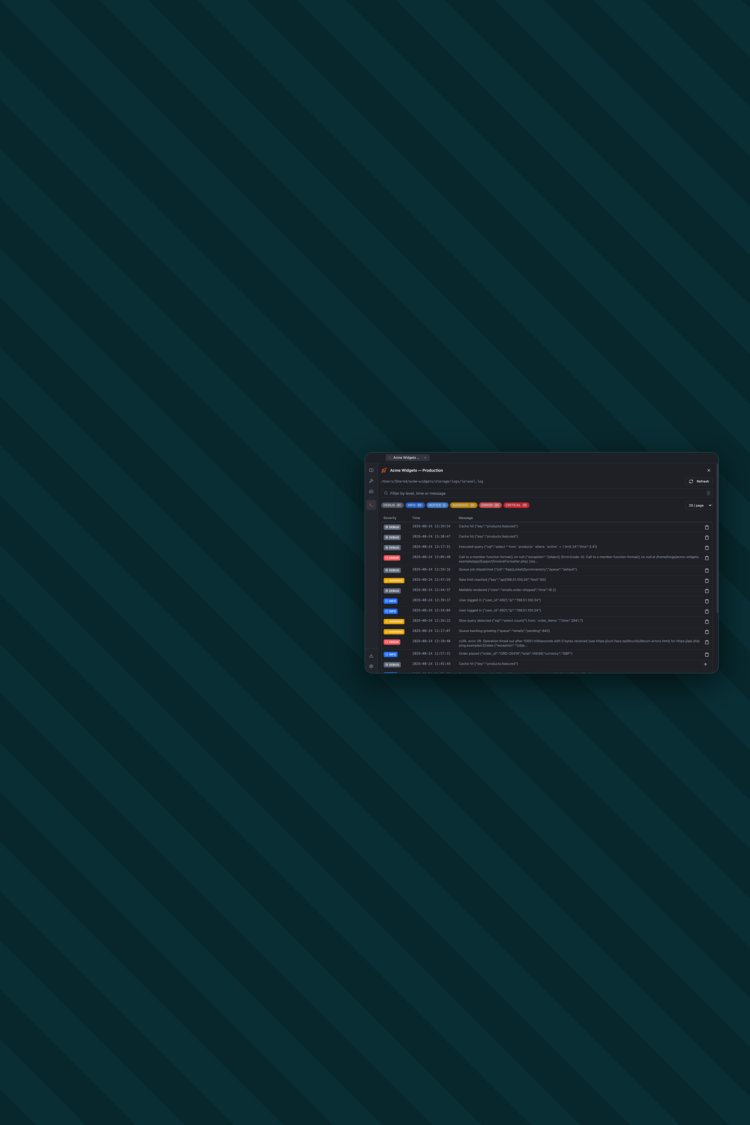
Tailspin is our Laravel log viewer for Mac, Windows and Linux, and as of this month it’s open source. Point it at a log file on disk, a server over SSH or your Laravel Forge account, and every entry becomes a row you can filter by severity, search and expand. MIT licensed, free, source on GitHub.
Something breaks in production, so you ssh into the box, cd into storage/logs and tail the last five hundred lines of laravel.log. Out comes a forty-line stack trace wrapping through the terminal, interleaved with the dozen other exceptions thrown that minute. You find the one you want, lose it while scrolling, and start again. Then you do the same on the queue worker, and again on the other server.
Tailspin is that loop without the terminal.
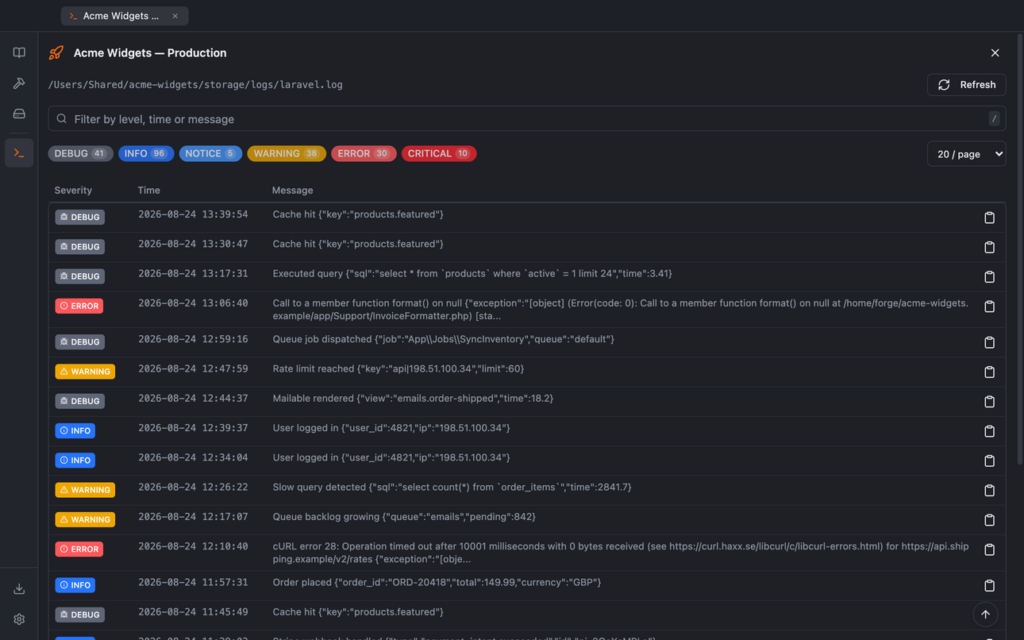
We built the first version in March 2023, under the less imaginative name Laravel Log Viewer, and we’ve been using it in-house since. It was never meant to be a product, just the thing we reached for when a client’s site fell over, and it stayed private because nobody had got round to the tidying a public repo needs.
This month we did the tidying. It got a name, a signed and notarized build for each platform, an updater, a README with screenshots that don’t contain a real hostname, and an MIT licence.
Open a .log file on disk, or connect to a server over SSH with a password or a private key and browse its log files from inside the app. If you host on Laravel Forge, add an API token and every server and site on your account is two clicks from its logs.
Multi-line Laravel entries are parsed into rows with a timestamp, environment and severity. Filter to just the errors, search the text, and expand an entry in place to read the full stack trace without losing where you were in the list. Leave auto-fetch running while you reproduce a bug and new entries appear at the top as they’re written.
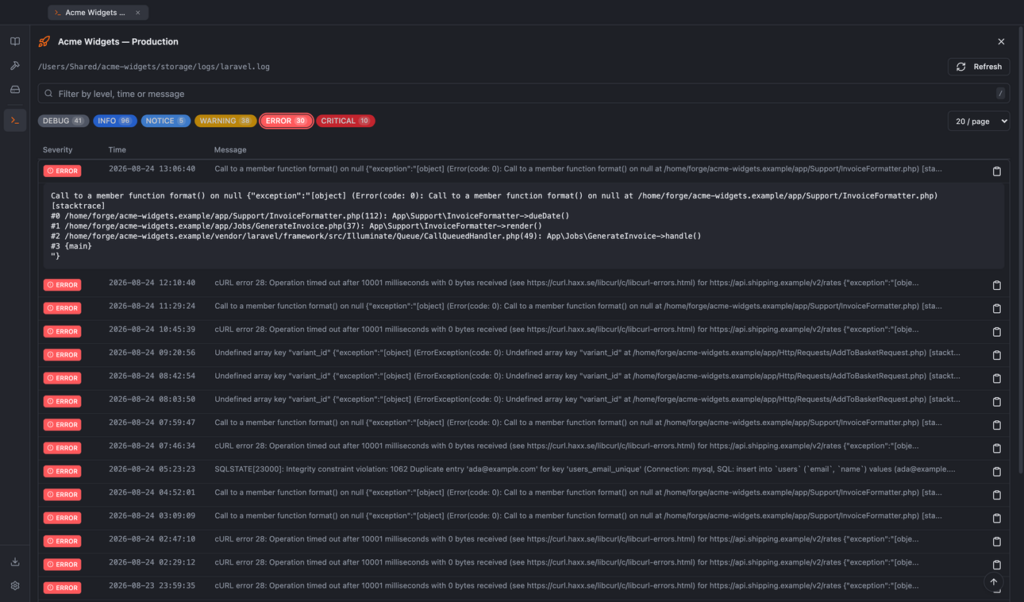
Connections are saved, so the sites you look at most often sit as favourites at the top of the list, and each one opens in its own tab. The app encrypts SSH passwords and the Forge token with a key held in the operating system’s keychain instead of writing them to disk in plain text, and it talks to nothing but your servers, Forge if you’ve set it up, and GitHub for update checks. There’s no account and nothing phones home.
In July we wrote about Markappoly, our Markdown viewer, and why we built it on Tauri rather than Electron. Tailspin is Electron, with Vue 3 on the front, and the reason is less principled than a framework comparison: we built it on Electron in 2023, and it works.
The SSH client is also a Node library, and it lives in Electron’s main process without any ceremony. In Tauri it would have to go through Rust. Rewriting a tool that works, to shrink a download you install once, didn’t seem like a good use of anyone’s week. The Markappoly piece said Tauri’s trade-off isn’t worth it for an internal tool, and Tailspin was an internal tool for three years.
That same article said the tempting thing to postpone on a desktop app is updates, and that building the updater in at the start costs far less than retrofitting it. Then we shipped Tailspin 1.0.0 with update checks switched off, pointed at an update service that was never deployed.
Anyone who installed 1.0.0 has to download 1.1 by hand, once. From there the app checks the GitHub release feed a few seconds after launch, downloads a new version only when you ask it to, and installs it when you quit. We retrofitted the thing we’d told everyone not to retrofit, within a month of writing it down.
The release pipeline is the Markappoly one, adapted. A release is a git tag. Push it and CI builds Apple Silicon, Intel Mac, Windows and Linux in parallel, signs and notarizes the macOS builds, opens a draft release with nine files attached, and publishes it once all three platforms succeed. If one fails, the release stays a draft and nobody sees it. It’s all in the README, including what to do when a platform falls over half way through.
Downloads are on the releases page: a .dmg for Apple Silicon or Intel Macs, an installer for Windows and an AppImage for Linux. You don’t need an account, and the macOS builds are notarized so Gatekeeper lets them straight through.
The source is on GitHub under the MIT licence. It’s provided as-is and we don’t offer support for it, but if it saves you a tail -n 500 or two, that’s what it’s for.