From enquiry to a written brief
Sales staff record each customer with its regions, sites, plots and contacts. Every job gets a brief of up to 13 sections, which change with the type of job, and the finished brief goes out as a PDF.

We built an interior design and installation business the system it runs on. Sales, design, costing, purchasing, the warehouse, finance and the install crews share one platform, built to replace a patchwork of tools and department spreadsheets.
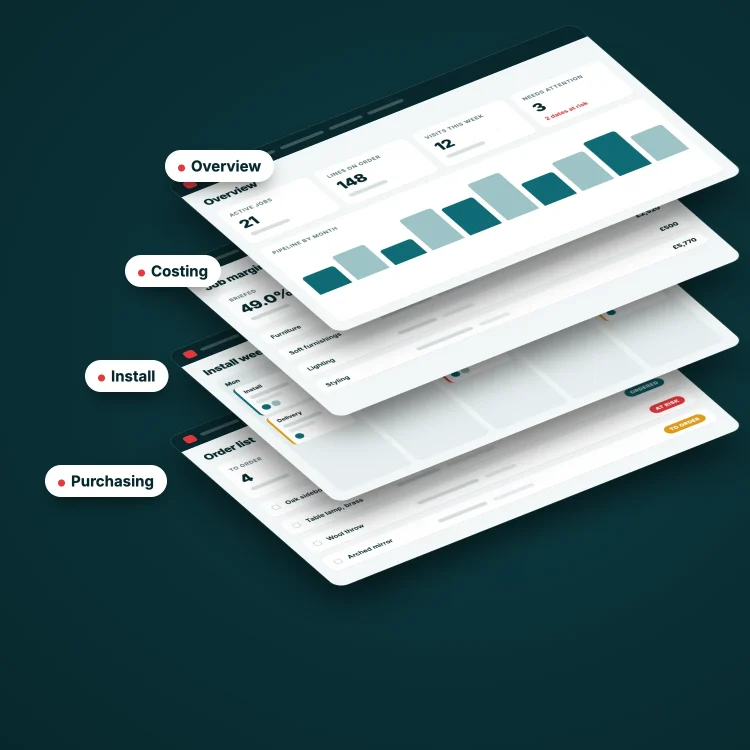
Every job passed through seven departments. Planners re-entered the same details in one system after another, and buyers retyped items from spreadsheets because the tools didn’t talk to each other.
Operations planners told us they entered the same details into seven or eight separate systems for every job.
Purchasing, the warehouse and finance each ran on large spreadsheets of their own. One stock sheet had 56 columns.
The business budgets room by room and delivers through install visits. It wanted a system built around those ideas, using the words its staff already use.
The platform covers CRM, briefing, design scheduling, costing and quotations, purchasing, the warehouse, finance and install operations. Each department has its own screens, and they all work from the same job record.
A product chosen for a room becomes an order line, then a purchase order, then stock in a warehouse location, then an item on the pick list for an install visit. The details are entered once and carried through.
Sales staff record each customer with its regions, sites, plots and contacts. Every job gets a brief of up to 13 sections, which change with the type of job, and the finished brief goes out as a PDF.
Managers schedule designers on a weekly calendar and see each person’s workload. The system suggests how long each task should take and warns when two tasks overlap.
Designers and specifiers choose products for each room against budget groups, and markup and margin are worked out as they go. A quotation can carry several options, and generating it locks the sell values.
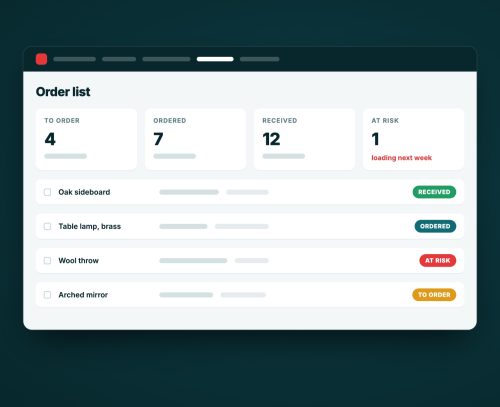
Released items land on the order list, where each line has one of more than 30 statuses that track it from release to install. Buyers raise purchase orders from the list, and any change to the specification after release is flagged on the line.
The warehouse books deliveries in against purchase orders and gives stock a location. Flat-pack and workshop queues show what has to be built before a job loads, and pick lists and load manifests come from the same data.
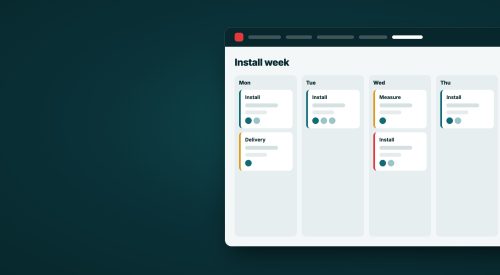
Operations planners see every visit with a red, amber or green status. They drag visits onto days, tick the installers on site each day, and publish the week. Stock is released for picking once operations has authorised the job.
Supplier invoices are matched against purchase orders, and anything that doesn’t match is queued for someone to resolve. Overhead purchases follow approval routes set by department and amount.
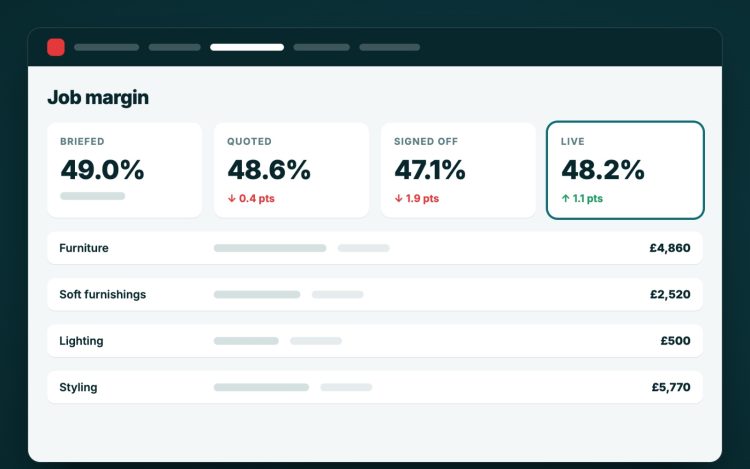
When a quotation is generated, the system locks its sell values and keeps a snapshot of the costs behind it. Each job then shows four sets of figures side by side:
Each set shows how far it has moved from the brief, in pounds and as a percentage, so a margin that has slipped since the quote is visible on the job.
The order list does the job the purchasing spreadsheets used to do. Buyers see every line for every live job, with its loading date and status.
1
We began by talking through how a job moves across the business and where it stalls.
2
Each department sent the spreadsheets and documents it worked from, and we wrote down the rules behind them.
3
We built a clickable prototype of the costing, purchasing, warehouse, finance and install screens, so staff could try their working day on screen.
4
The people who would use each module went through the prototype with us and told us what was wrong. We wrote down the rules we agreed.
5
The prototype and the written rules became the specification. Each module is built and tested behind its own switch, and turned on when the department is ready.
6
Feedback from each team comes in as tickets and goes out in small releases, while the next module goes through the same steps.
The platform tracks orders and stock for the whole company and feeds its accounts, so most of the engineering is about keeping the figures right.
The test suite has more than 2,800 cases across costing, ordering, stock and scheduling.
Each module can be switched on separately. Finished work goes live for one department while later modules are still being built.
The system knows about 50 job roles, from directors to installers, and each person sees the screens their role needs.
A quotation keeps its own copy of prices and budgets, so later changes to products or costs never alter what the customer was sent.
Changes to install dates, quotations, stock and order lines are recorded with who made them and when.
Briefs, quotations and purchase orders are produced as PDFs. Customer and supplier records can be imported from Excel, and the main lists export to it.